
Read the org structure & headcount
Learn HR · Generalist HR Lifecycle · Task A1. Before you hire, pay, or report on a single person, you have to be able to read the organisation itself — its shape, its approved posts, and how many of them are actually filled.
What it is
An organisation structure is how a company divides its work into units and connects them with reporting lines. It answers two different questions at once:
- Where does the work sit? — the unit tree: Global HQ → Regional HQ → Country office → Division → Department → Team. This is where the organisation operates, independent of what any one project delivers.
- Who reports to whom? — the reporting lines that run through the people in those units.
Three measurements make a structure legible rather than just a diagram:
- Layers — how many levels deep the tree goes. More layers = slower decisions and more hand-offs.
- Span of control — how many people report directly to one manager. Too narrow (one or two) wastes a management layer; too wide (fifteen) means no one is actually being managed.
- Headcount vs establishment — the single most important distinction on this page. The establishment is the set of approved, budgeted posts (the empty chairs the organisation has decided and funded). Headcount is the people who actually fill them. The difference is your vacancy gap — and it is where recruitment, budget, and workforce planning all meet.
And one number that quietly trips up every new HR officer: headcount is not FTE. Two half-time people are 2 heads but 1.0 FTE (full-time equivalent). A director who splits their week across operations and two projects is 1 head but their time is divided. You need both lenses, and they rarely match.
Why it matters
- It's the base map everything else hangs off. A recruitment vacancy, a payroll line, a leave balance, a performance review — each one points at a real box in this structure. If the box doesn't exist, the record downstream is a ghost that breaks reconciliation.
- Establishment is a budget control, not a diagram. "We're approved for 12 engineers, we have 10" is a sentence the CFO, the hiring manager, and the auditor all care about. The establishment is how HR says yes or no to a hire without re-opening the budget every time.
- The vacancy gap is the hiring plan. Every vacant seat on the establishment is a recruitment requisition waiting to happen (A3) — and every frozen seat is a cost deliberately parked.
- Structure is an early-warning signal. A team with a span of fifteen, or a country office running at 60% filled for two quarters, tells you something is wrong before anyone complains.
- It's the anchor for cost and compliance. Each unit can be a cost centre, so the finance side (Learn Finance) tags every transaction to the same tree you manage here — one structure, two lenses.
Where you do it in VanillaPM
Four org-level workspaces, reached from the organisation's left-hand navigation, read and manage the structure. A new HR officer walks them in this order:
-
Structure — the unit tree (
apps/organizations). Build the organisation as typed nodes — Global HQ · Regional HQ · Country office · Division · Department · Branch · Unit · Team · Outlet — at any depth and in any shape (a rigid 8-level ladder breaks on the first org that skips a level). Each unit carries a code, a country, a cost-centre flag, and an active/inactive state — you deactivate a unit, never delete it, so history survives.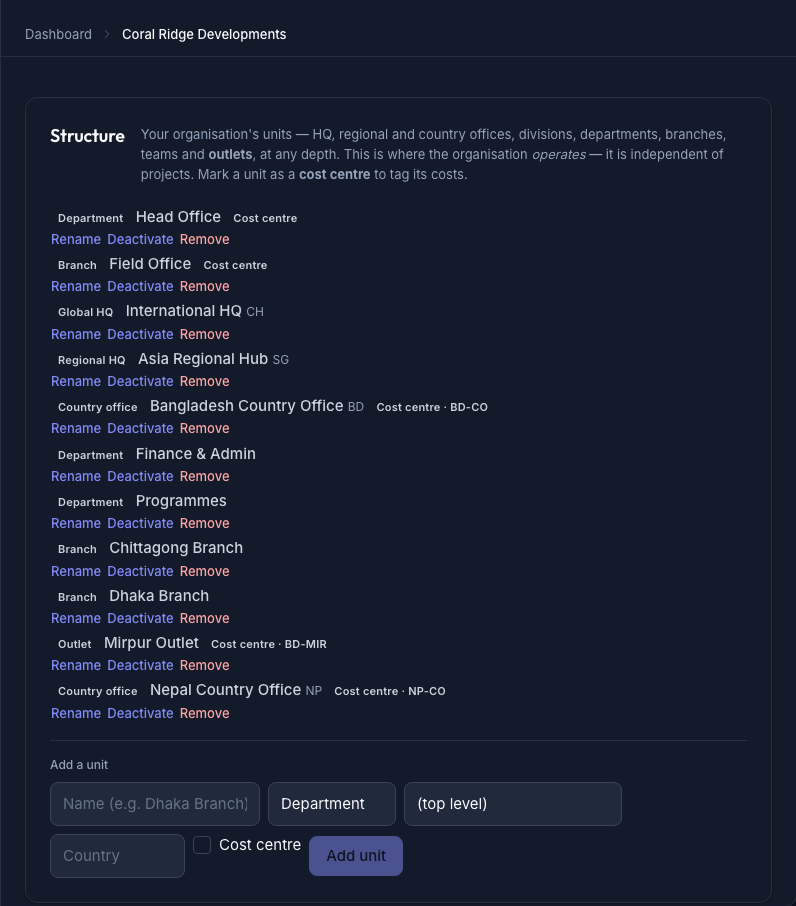
The Structure page — the organisation's typed unit tree (HQ · regional & country offices · departments · branches · outlets), each tagged with its type and, where it's a cost centre, its code -
Establishment (the Positions page) — the org's approved posts (
apps/workforce). The page leads with three totals — Budgeted · Filled · Vacant — then a table of every post: Position · Unit · Grade · Status · Budgeted · Filled · Vacant, with vacant seats flagged. Each post has a budgeted headcount (how many seats) and a status — Open, Frozen (budgeted but hiring paused), or Closed (abolished). This is the establishment; its vacancies feed recruitment.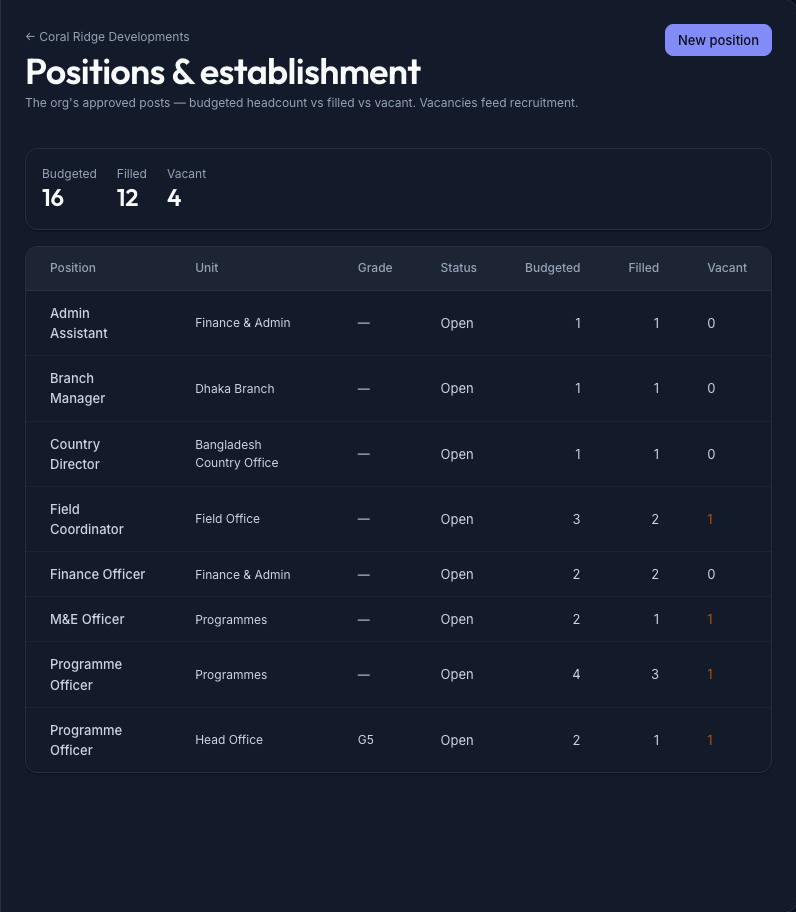
The Establishment page — approved posts with Budgeted · Filled · Vacant totals up top and a per-post table below; vacant seats are flagged in amber, and those vacancies feed recruitment -
Staff — the people (
apps/workforceEmployee). Each employee sits in a duty station (a unit on the tree) and points at a supervisor (their reporting line). Note that an employee is not a login — a daily or field worker exists here with no platform account at all (that's the whole of A2).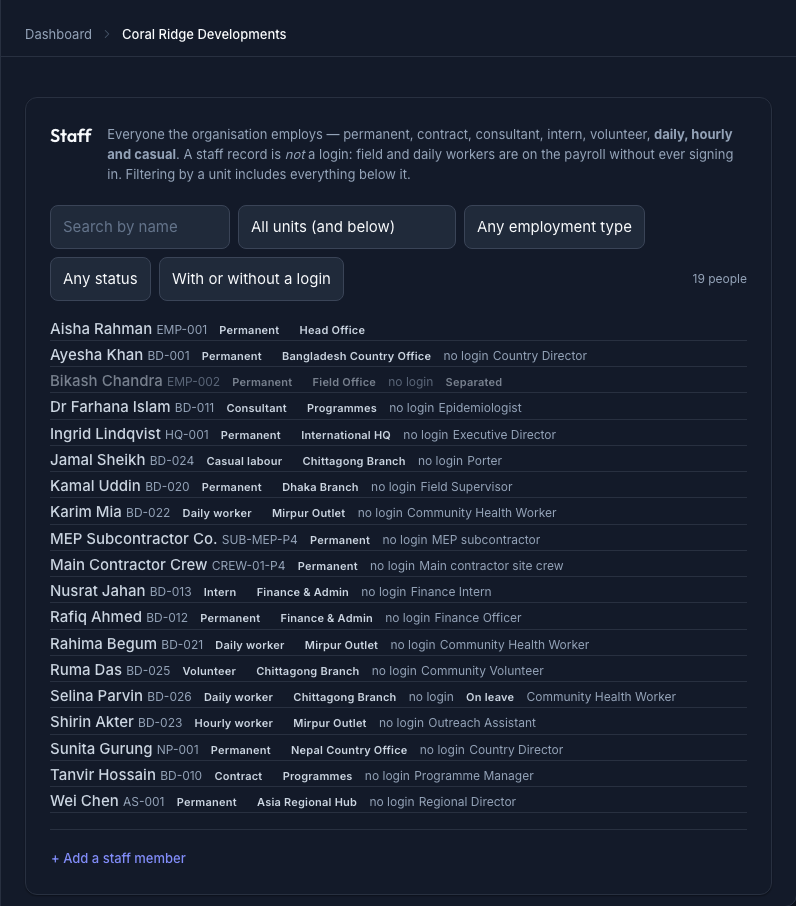
The Staff list — every employee with their employment type, duty station and job title; the "no login" badges are the point: a staff record is not a platform account -
Allocation & Workforce reports — the headcount view. Workforce reports give you headcount by unit — and crucially a country office's figure is its own people plus everyone in the units below it (the roll-up) — plus headcount by employment type. Allocation shows FTE, because a person's time is split with StaffAssignment: an assignment goes to one operational unit or one project, and overlapping assignments must sum to ≤ 100% — the system refuses the 5% that would make someone more than one person.
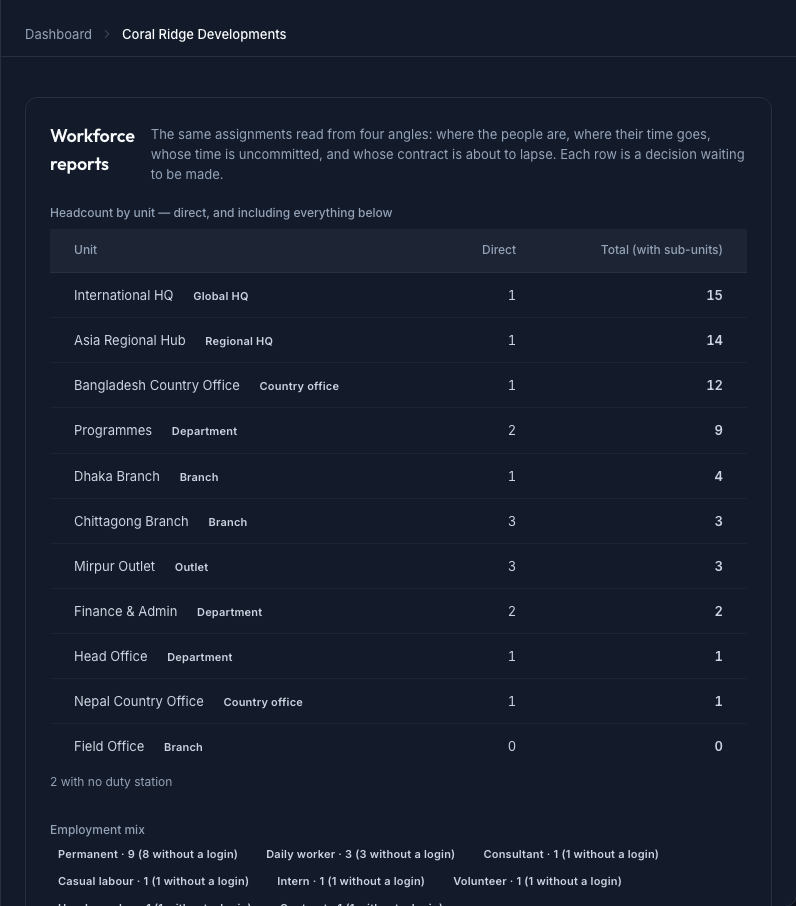
Workforce reports — headcount by unit shown two ways: *direct* (the unit's own people) and *total with sub-units* (the roll-up — own people plus everyone below), with the employment-type mix beneath
Walked example — reading the Meridian multinational
You're the new HR officer at the multinational building Meridian, its internal payments platform (the same Meridian the finance track costs). On day one you open Structure and read the tree. (Figures illustrative until the corporate seed lands.)
Meridian Global (Global HQ)
├── APAC (Regional HQ)
│   └── Bangladesh (Country office · cost centre BD-01)
│       ├── Engineering (Department)
│       │   ├── Platform (Team)   ← where Meridian is built
│       │   └── Mobile (Team)
│       └── Operations (Department)
└── EMEA (Regional HQ)
Five layers deep, typed at each node. You note the Engineering manager has 7 direct reports — a healthy span. Then you open Establishment for the Bangladesh country office and read the posts:
- Backend Engineer (Platform) — budgeted 4, filled 2 → 2 vacant. Open.
- Mobile Engineer (Mobile) — budgeted 3, filled 3 → 0 vacant. Open.
- Platform Architect (Engineering) — budgeted 1, filled 1. One person, split 50% Platform / 50% Mobile on the Allocation view — 1 head, 1.0 FTE across two teams.
- Country Director (Bangladesh) — budgeted 1, filled 1, split 40% Operations · 35% one project · 25% another = fully committed; the next assignment is refused.
- Support roles (Operations) — budgeted 3, filled 3. Two are part-time — 2 heads, 1.0 FTE.
The two vacant Backend Engineer seats aren't a surprise to chase down later — they're the start of your hiring plan, and each becomes a vacancy in recruitment. Nothing here needed a meeting; you read it off the page.
The records — headcount vs establishment
Here is the Bangladesh country office as the Establishment and Workforce reports pages show it — the same organisation, two lenses:
| Unit | Budgeted (establishment) | Filled (headcount) | Vacant | FTE |
|---|---|---|---|---|
| Platform | 5 | 3 | 2 | 3.0 |
| Mobile | 3 | 3 | 0 | 3.5 |
| Operations | 4 | 4 | 0 | 3.0 |
| Bangladesh (roll-up) | 12 | 10 | 2 | 9.5 |
What an HR officer reads from it:
- Budgeted 12, Filled 10 → an 83% fill rate; the 2-seat gap is the hiring plan, not a mystery.
- Headcount 10, FTE 9.5 → part-time and split roles mean ten people deliver nine-and-a-half people's time — the number you budget capacity against, not headcount.
- Vacant concentrated in Platform → that's where the delivery risk is; prioritise those reqs.
- Roll-up vs direct → the country office "has 10" only when you count every unit beneath it; the Platform team on its own has 3. Always know which number you're quoting.
Controls & assurance
What keeps the structure trustworthy:
- Every person ties to a real unit. An employee's duty station is a node on the tree, so there is no floating headcount and no orphaned payroll line.
- The establishment is the gate. You can't quietly hire into a seat that was never budgeted — the post, its budgeted headcount, and its Open/Frozen/Closed status are the control.
- Deactivate, never delete. Closing a unit or a post retires it without erasing the history attached to it — essential when an auditor asks what the structure looked like last year.
- FTE is enforced, not trusted. Overlapping assignments that would exceed 100% are refused at save time, so no one is accidentally funded as 1.3 of a person across two budgets.
- Cost-centre discipline. A unit flagged as a cost centre is the same dimension finance tags spend against — structure and ledger reconcile because they share one tree.
Best practices & pitfalls
- Do keep the establishment current before you recruit — the vacant seat is the authority to hire. Recruiting first and reconciling the headcount later is how ghost posts appear.
- Do quote headcount and FTE together whenever capacity is the question; one without the other misleads.
- Do watch spans and layers — a span of fifteen or a brand-new fourth layer is a reorg signal worth raising.
- Pitfall: confusing budgeted with filled. "We have 12 engineers" is usually the establishment, not the people in the building — check the Filled column.
- Pitfall: deleting a unit after a reorg. You lose the trail; deactivate it instead.
- Pitfall: a vacancy with no post behind it, or a post with no unit — both break the chain from org chart → establishment → headcount → payroll that every downstream report relies on.
Practise question
Q1. A department shows Budgeted 20, Filled 14 on the Establishment page, but Workforce reports lists only 11 people in that department. The manager insists they're "fully staffed." As the HR officer, what's going on, and what do you check?
Answer: Three different numbers are in play. Budgeted 20 is the establishment (approved seats). Filled 14 counts post assignments — which can include people whose duty station is elsewhere but who occupy a post here, or part-timers. 11 is the headcount whose duty station is this department. "Fully staffed" is almost certainly false: there's a 6-seat vacancy gap (20 − 14) regardless. Reconcile the two views — check whether some of the 14 are split/part-time (so FTE is below 14) and whether any "filled" posts are occupied by people reported under another unit. The honest status is 14 of 20 budgeted seats filled, ~11 FTE here — and six open reqs, not a full house.
Terms used here
- Org unit — a typed node in the structure tree (Global HQ → … → Team/Outlet); where the org operates, independent of any project.
- Establishment — the set of approved, budgeted posts; the empty chairs the org has funded.
- Position / post — one approved post on the establishment: a unit, a budgeted headcount, and a status (Open · Frozen · Closed).
- Headcount — the people who actually occupy posts. Not the same as the establishment.
- Vacancy — a budgeted seat with no one in it (budgeted − filled); feeds recruitment.
- FTE (full-time equivalent) — capacity in whole-person units; two half-timers = 1.0 FTE.
- Span of control — direct reports per manager. Layers — levels deep in the tree.
- Duty station — the unit an employee sits in. Cost centre — a unit finance tags spend to.
- Related: Maintain the employee record (Employee ≠ User) — the record behind each head.
What an auditor / workforce planner expects
They expect the chain to hold: org chart → establishment → headcount → payroll, with no broken links. Every person traces to an approved post in a real unit; every vacancy is a budgeted seat, not an informal promise; the fill rate and FTE are reconcilable, not two unrelated numbers; and the history survives a reorg because units and posts are retired, never deleted. A workforce planner reads the same page as a forecast — this establishment, this fill rate, these spans — and asks where the organisation is over- or under-structured. "Here is the approved establishment, here is who fills it, and here is the gap" is a workforce plan; a headcount with no establishment behind it is just a list of names.