
Maintain the employee record
Learn HR · Generalist HR Lifecycle · Task A2. The record behind every head on the establishment — the one source of truth HR owns, and the one that carries the most sensitive data in the whole organisation.
What it is
The employee record is the master file for one person's employment: their identity, how they're employed, where they sit, and the personal data the organisation holds about them. It's the spine the rest of HR hangs off — payroll pays this record, leave accrues against it, performance reviews attach to it. Get it right and everything downstream is clean; get it wrong and every report inherits the error.
Three ideas make it a discipline rather than a spreadsheet:
- An employee is not a login. The decisive design decision: the record of being employed is separate from having a platform account. A daily worker, a field porter, a casual labourer — people who are fully on the payroll and never sign in — are complete employee records with no user account at all. Tying "employee" to "has a login" is the classic HRIS mistake that makes half your workforce invisible.
- Not all employee data is equal. An employee record holds three very different kinds of data, and they must not be visible to the same people: the basic facts (employed? what role? which unit?), the sensitive PII (national ID, bank account, date of birth, home address, emergency contact), and the pay. Each sits behind its own gate.
- Data minimisation. You hold the least you need, for the shortest time you need it. The record is a liability as much as an asset — every sensitive field you store is one you must protect, justify, and eventually dispose of.
Why it matters
- It's the single source of truth. Payroll, leave, performance, and reporting all read this record. If a duty station or employment type is wrong here, it's wrong everywhere — HR owns the correction, so HR owns the accuracy.
- Employee ≠ User keeps the real workforce visible. In an NGO or a field operation, most of the headcount may never log in. A model that can only see "users" under-counts the people you're actually responsible for — their pay, their leave, their duty of care.
- The sensitive data is a legal responsibility, not just a form. A national ID or a bank account in the wrong hands is a real harm. Separating who-can-see-employment from who-can-see-PII from who-can-see-pay is how you limit that blast radius.
- Accurate history is non-negotiable for pay. Compensation is effective-dated — never overwritten — so a payroll run from eight months ago can be reproduced exactly. "What were they paid in March?" must have one true answer.
Where you do it in VanillaPM
The employee record lives in two org-level workspaces (apps/workforce):
-
Staff — the list and the editable record. Add or open an employee and set their identity (a unique employee ID, name, job title), their employment (type — permanent · contract · consultant · intern · volunteer · daily · hourly · casual; status — active · on leave · separated; duty station and supervisor; joined-on and contract-end dates). The key field is the one that's optional: a login. Leave it empty and you've recorded a real employee — a daily or field worker — with no platform account, which is exactly right. You can filter the whole list by with or without a login.
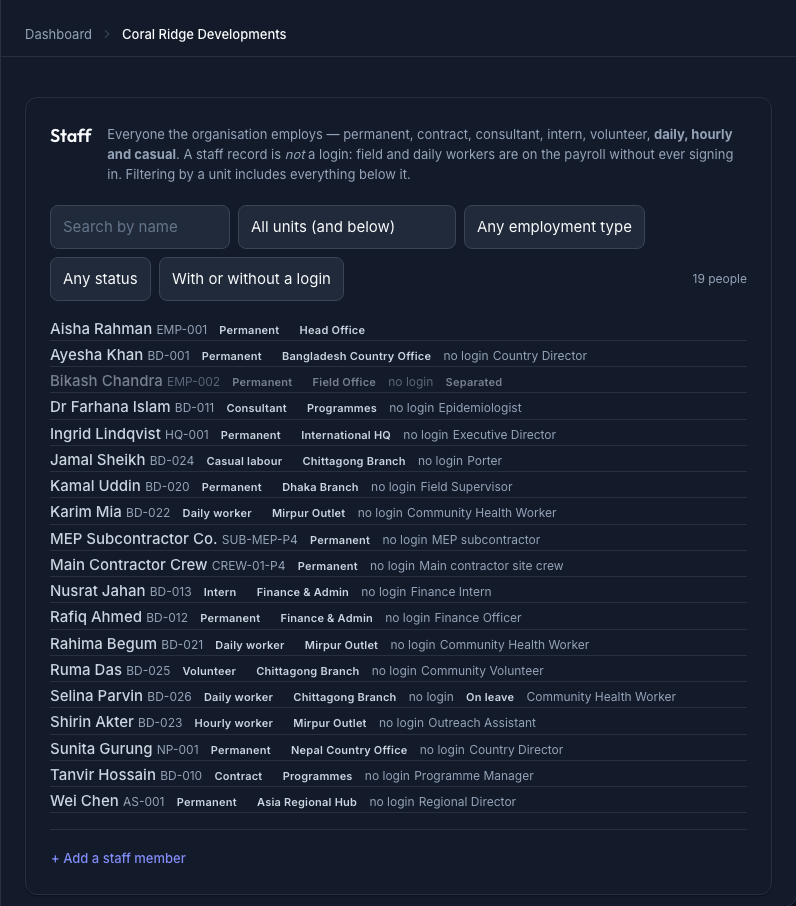
The Staff list — every employee with their employment type, duty station and job title, and a "no login" badge on the people who are employed but never sign in; filterable by unit, type, status, and login -
Staff 360 — the full personal record (CR-043). Beyond the employment basics, this holds the demographics (date of birth, gender, nationality, marital status) and the sensitive PII — national ID, bank account, personal phone, home address, emergency contact. These fields are masked for anyone without the
staff.pii.viewright: a manager can see that someone is employed and in which unit without ever seeing their national ID. Pay is gated separately again, behindstaff.salary.view, and is effective-dated — each change is a new row with its own effective from date, so no pay history is ever lost.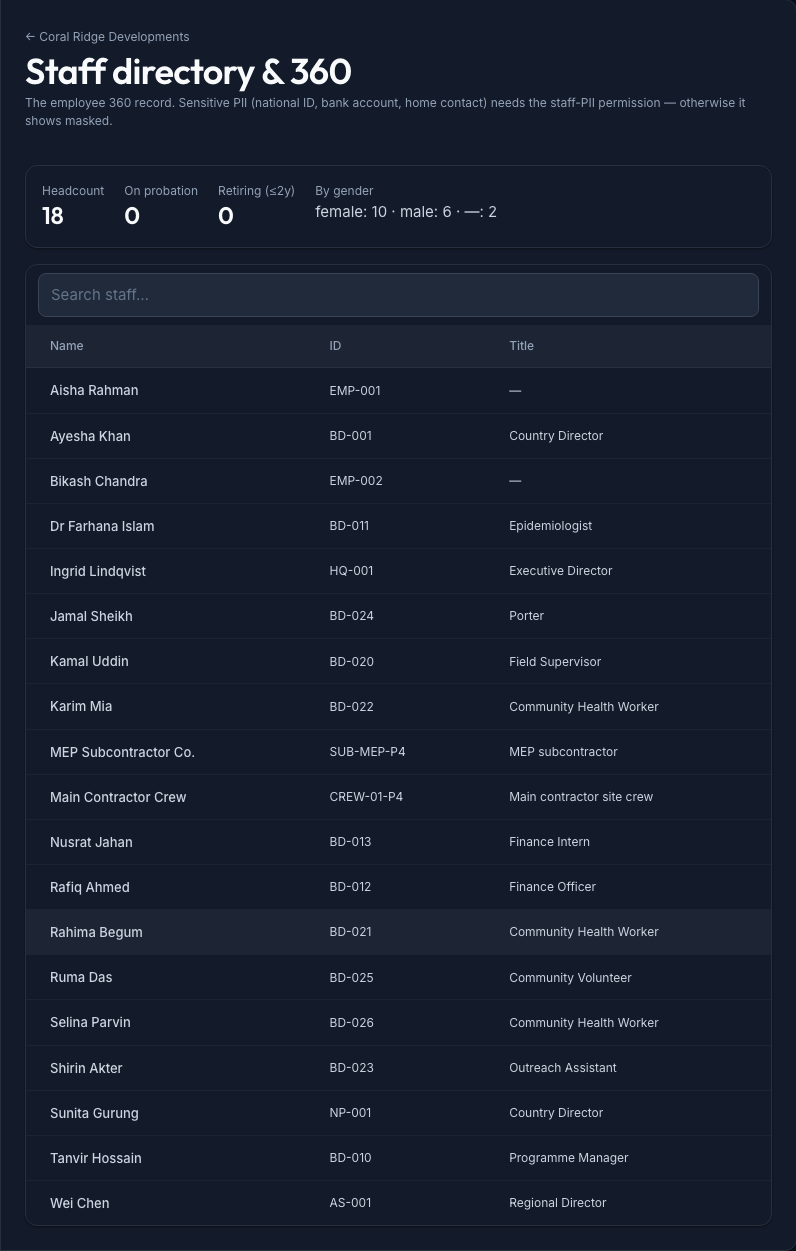
The Staff 360 record — identity and employment up front, demographics and sensitive PII (national ID, bank, date of birth, emergency contact) behind the staff.pii.view gate so they're masked for callers without it
Walked example — two very different records at Meridian
You're the HR officer at the multinational building Meridian. On the same morning you create two employee records that look nothing alike — and that's the point. (Figures illustrative until the corporate seed lands.)
-
Priya Nandakumar — Backend Engineer, permanent. You create her record: employee ID, name, title, permanent, duty station Platform, supervisor the Engineering manager, joined-on today. She'll use the platform, so you link her user account. Later, Finance adds her compensation (grade + step, effective from her start date) — which you can't see, because you don't hold
staff.salary.view, and that's correct. -
Karim Mia — site porter, daily worker. He is fully employed — on the payroll, accruing the day-rate — but he will never log in. You create his record with no user account: employee ID, name, employment type daily, duty station Mirpur Outlet. He is just as real in the system as Priya. A "users only" HRIS would have lost him entirely.
A new team lead joins and gets staff.view: they can see both people, their roles and units — but
Karim's bank account and Priya's salary are masked. Nothing leaked; they got exactly the view
their job needs.
The records — three tiers of visibility
The whole model is that one record carries three kinds of data behind three separate gates:
| Tier | Example fields | Who sees it (right) | The point |
|---|---|---|---|
| Basic employment | name · employee ID · title · type · status · duty station · supervisor | staff.view |
Most managers — "who works here, in what role" |
| Sensitive PII | national ID · bank account · date of birth · home address · emergency contact | staff.pii.view |
HR / payroll only — masked for everyone else |
| Compensation | grade · step · basic pay (effective-dated) | staff.salary.view |
A separate few — pay is its own secret |
What an HR officer reads from it:
- A record with no login is not an error — it's a daily/field worker, and the count of them is a real fact about your workforce (the employment-mix breakdown).
- A masked field is the control working, not a bug — if you can see someone's unit but not their national ID, the gate is doing its job.
- Compensation has a history, not a value — "basic pay" is a series of effective-dated rows, so any past payroll run reproduces exactly.
Controls & assurance
What keeps the record trustworthy and safe:
- Three separate rights, not one.
staff.view,staff.pii.view, andstaff.salary.vieware distinct — seeing that someone is employed never implies seeing their national ID or their pay. - Unique identity. The employee ID is unique within the organisation, and one person can hold at most one employee record per org (and one linked login), so there are no duplicate ghosts.
- Effective-dated pay. Compensation is appended, never overwritten — the audit answer to "what were they paid, and when did it change?" is always reconstructable.
- Deactivate via status, don't delete. A leaver becomes separated (A9), keeping the history payroll, tax, and any future dispute will need.
- Least-privilege by default. A new manager gets
staff.view; PII and salary are granted deliberately, to the few who need them.
Honesty box — what the product does, and what is your policy
The system gives you the field-level gate — PII and pay are masked unless the caller holds the right. It does not, by itself, run your data-protection policy. Lawful basis for holding a national ID, a retention schedule (how long before you dispose of a separated worker's bank details), consent records, and data-subject requests (access, correction, erasure under GDPR or your local law) are organisational policy and process — they live in your Knowledge Library as a data-protection policy, not in a button here. Teach them as part of the job; don't assume the product enforces your retention schedule, because it doesn't.
Best practices & pitfalls
- Do record the daily and field workforce as full employee records without logins — they're on the payroll, so they belong in the system.
- Do keep PII to what you actually need, and know why you hold each sensitive field.
- Do grant
staff.pii.viewandstaff.salary.viewsparingly and deliberately. - Pitfall: treating "employee" as "has a login" — the fastest way to make half your workforce invisible to pay and duty of care.
- Pitfall: overwriting a pay figure instead of adding an effective-dated change — you lose the ability to reproduce a past payroll run.
- Pitfall: hoarding PII "just in case." Every sensitive field you don't need is pure liability with no offsetting value.
Practise question
Q1. A manager asks why they can see that a field worker is employed in the Mirpur Outlet but can't see the worker's bank account or whether they even have a login showing. They think the record is "broken." As the HR officer, how do you explain it?
Answer: Nothing is broken — two designs are working as intended. The bank account is sensitive
PII, gated behind staff.pii.view, which the manager doesn't hold; they get staff.view (role,
unit, status) but not the national ID or bank details, which is exactly the least-privilege control
limiting who can see what. And the worker legitimately has no login — a daily worker is a full
employee record without a platform account (Employee ≠ User). The manager is seeing precisely
the slice their role needs: who works here and in what role, with the sensitive data masked.
Terms used here
- Employee record — the master file for one person's employment (identity · employment · demographics · PII · compensation).
- Employee ≠ User — being employed is separate from having a login; the user account is optional, so field/daily workers exist with no account.
- Employment type — permanent · contract · consultant · intern · volunteer · daily · hourly · casual. Status — active · on leave · separated.
- PII — personally identifiable / sensitive data (national ID, bank, DOB, address, emergency
contact); masked behind
staff.pii.view. - Effective-dated compensation — pay stored as dated rows, appended not overwritten, so history reproduces.
- Data minimisation — hold the least data you need, for the shortest time you need it.
- Related: Read the org structure & headcount — the establishment these records fill · Offboard / separation — where a record becomes separated.
What an auditor / data-protection officer expects
They expect one accurate record per person, with access proportionate to need: that someone who can confirm employment can't necessarily read a national ID, and that pay sits behind its own gate. They expect pay history that reconstructs any past run, leavers retained as separated rather than deleted, and — the part that is yours — a data-protection policy behind the field-level masking: a lawful basis for each sensitive field, a retention schedule that's actually applied, and a route for a worker to ask what you hold. "We mask PII by role, and here is the policy that governs why we hold it and for how long" is a complete answer; a field-level gate with no policy behind it is only half of one.