
Manage time, attendance & leave
Learn HR · Generalist HR Lifecycle · Task A5. The daily rhythm of people operations — who's in, who's off, and how much leave everyone has left. Small, constant, and the data payroll leans on.
What it is
This task is two linked jobs that run every single day:
- Time & attendance — recording who worked, when, and for how long, against the shift that sets their expected hours. Each day becomes an attendance record: present (with check-in / check-out and hours), absent, on leave, holiday, or weekend.
- Leave — managing time off as typed, entitled, and balanced. Each leave type (annual, sick, casual, unpaid…) has an annual entitlement; each employee has a balance that starts at that entitlement and is decremented as leave is approved. A request moves pending → approved / rejected, and days are counted on the working calendar (weekends and holidays don't burn leave).
Two ideas make it a discipline, not just record-keeping:
- Balances are the truth, entitlements are the policy. The type says "20 days a year"; the balance says "Aisha has 18 left." You manage the balance; the entitlement just seeds it.
- Approval is maker-checker. The person who requests leave is not the person who approves it — a simple control that stops self-granted time off and keeps the record defensible.
Why it matters
- It's the feedstock for payroll. Attendance hours and unpaid-leave days feed what people are paid. Get the day wrong here and the pay is wrong downstream.
- Leave is a liability you carry. Accrued-but-untaken leave is money the organisation owes; balances that nobody watches become a nasty surprise at year-end or on separation.
- Fairness is visible. Typed leave with transparent balances and maker-checker approval is how you show that time off is granted by rule, not by favour.
- Patterns are early signals. A creeping absence rate, or a team that never takes leave, tells you something about workload or morale before it shows up as attrition.
Where you do it in VanillaPM
Two workspaces: Attendance and Leave (apps/attendance, apps/leave). A step-by-step:
-
Record attendance. In Attendance, pick an employee and a month. Mark day — enter a check-in (and check-out) to mark the day present with its hours, or leave it blank to mark it absent. Days are measured against the employee's shift (its expected hours). The month shows a running summary — present · absent · hours — over the day-by-day record.
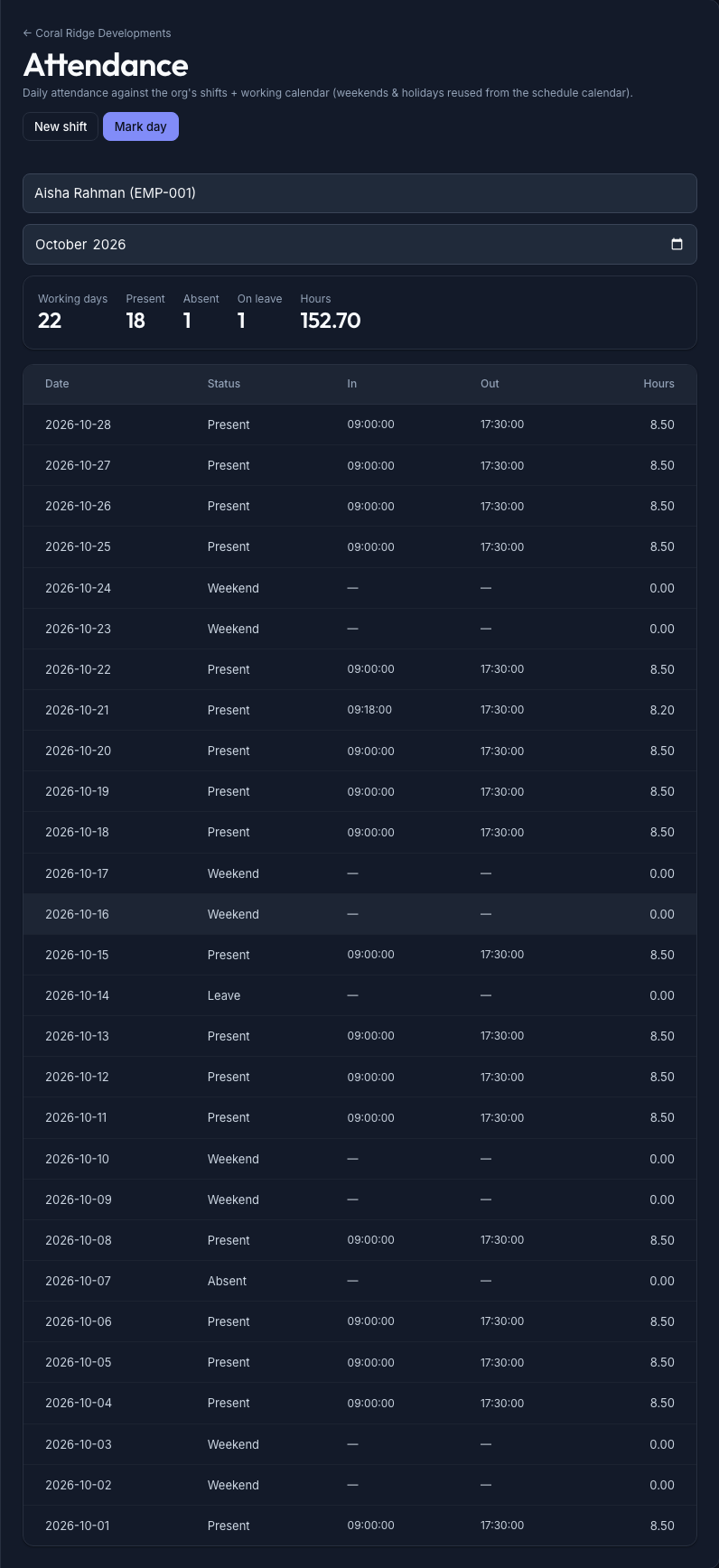
The Attendance workspace — an employee's month at a glance: a present/absent/hours summary over the day-by-day record (status · check-in · check-out · hours), marked against their shift -
Set up the leave types. In Leave, define each type once — its name, whether it's paid, and its annual entitlement (the days-per-year everyone of that type gets). This is the policy the balances are seeded from.
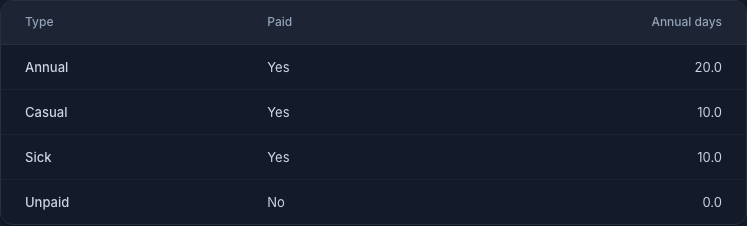
The leave types — each type with whether it's paid and its annual entitlement; this is the policy that seeds every employee's balance -
Track the balances. The Balances table shows each person's remaining days against the entitlement, and how much is used. A balance starts at the entitlement and is decremented each time leave is approved — a low balance is flagged, so you can see at a glance who's nearly out before you approve the next request.
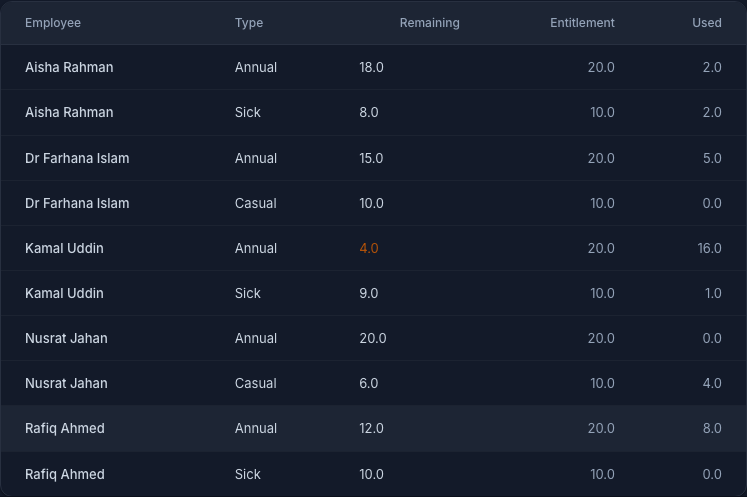
The Balances table — remaining vs entitlement (and used) per employee and type; low balances are flagged so you can see who's nearly out before approving more -
Apply for, and approve, leave. Apply for leave records a request (employee · type · dates); the system counts only working days in the span. It lands pending, and someone other than the requester Approves or Rejects it. Approval decrements the balance — the request, the decision, and the new balance all line up.
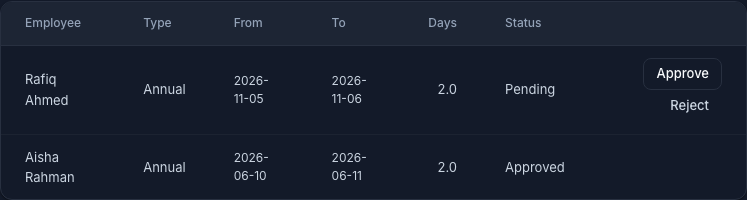
The leave requests — each with its type, dates, working-day count and status, and Approve / Reject actions; approval is maker-checker and decrements the employee's balance
Walked example — a month of time & leave at Meridian
You run people ops at the multinational building Meridian. Take Aisha Rahman's October. (Figures illustrative until the corporate seed lands.)
- Across the month you mark her attendance: present most weekdays (check-in 09:00, ~8.5h), one absent day, one on leave, weekends marked as such. Her summary: ~18 present · 1 absent · ~155 hours — the hours that flow to payroll.
- Her leave types are set: Annual 20 · Sick 10 · Casual 10. Her balances read Annual 18 / 20 (she's used 2) and Sick 8 / 10.
- She applies for two more annual days; the request lands pending at 2 working days.
- Her manager — not Aisha — approves it. Her Annual balance drops to 16 / 20; the record shows the request, who approved it, and the new balance. Nothing self-granted, nothing untracked.
The records — what the day and the balance capture
| What it captures | Who reads it | |
|---|---|---|
| Attendance record | per day: status · check-in / check-out · hours (vs the shift) | payroll (hours, unpaid days); HR (absence patterns) |
| Leave balance | remaining vs entitlement vs used, per type | HR & the employee — "how much is left?"; finance — the accrued liability |
| Leave request | type · dates · working-days · status · approver | the audit trail — who was off, when, approved by whom |
What an HR officer reads from it:
- Hours drive pay — the month's present-hours and unpaid-leave days are what payroll meters.
- A low balance before you approve — approving leave someone doesn't have is how you create a negative balance and an awkward conversation; the table warns you first.
- Working-day counting — a Thursday-to-Monday request is 2 days, not 5; the calendar does the counting so leave isn't over-burned.
Controls & assurance
- Maker ≠ checker. The requester can't approve their own leave — the core control against self-granted time off.
- Balances decrement on approval, not on request. A pending request doesn't move the balance; only an approval does, so the balance always reflects granted leave.
- Typed and entitled. Leave is always of a defined type with a defined entitlement — no ad-hoc "I'll just take a few days" that nothing records.
- Working-calendar counting. Days are counted on the working calendar, so weekends and holidays don't silently consume someone's balance.
- One record per employee per day. Attendance can't double-count a day, so the hours that reach payroll are unambiguous.
Best practices & pitfalls
- Do keep attendance current — a month marked in arrears is a month of guessed hours.
- Do watch balances before approving, not after — the flag is there for a reason.
- Do keep entitlements as typed policy, so a change to "annual leave" is one edit, not a hundred.
- Pitfall: approving your own (or a friend's, off the record) leave — it breaks maker-checker and the trail that makes the decision defensible.
- Pitfall: treating accrued leave as free — untaken balances are a real liability finance has to carry and settle on separation.
- Pitfall: marking a whole team present by default — attendance you didn't actually check is payroll data you can't stand behind.
Practise question
Q1. An employee asks you to approve 5 days of annual leave for next week. Their balance shows 3 / 20 remaining, and the request spans a Thursday to the following Wednesday. What do you check, and what do you do?
Answer: Two things. First, the count: Thursday-to-Wednesday isn't necessarily 5 leave days — the system counts working days on the calendar, so the weekend (and any holiday) drops out; the real figure might be 4. Second, the balance: they have only 3 remaining, so even 4 working days over-draws them. You don't silently approve into a negative balance — you flag it, and either the days are reduced to what's left, the remainder goes as unpaid leave (a different type), or it's escalated per policy. And since it's their leave, someone other than them records the approval. The balance drops only once it's approved.
Terms used here
- Attendance record — one day's status (present · absent · on leave · holiday · weekend) with check-in / check-out and hours.
- Shift — the pattern that sets an employee's expected hours; attendance is measured against it.
- Leave type — a kind of leave (annual · sick · casual · unpaid…) with a paid flag and an annual entitlement.
- Balance — remaining days of a type for an employee; starts at the entitlement, decremented on approval.
- Maker-checker — the requester and the approver must be different people.
- Working-day counting — leave days are counted on the working calendar (weekends / holidays excluded).
- Related: Maintain the employee record — whose time this is · Cross-project time allocation — where that time is charged.
What an auditor / payroll lead expects
They expect the chain to hold: attendance → hours → pay, and entitlement → balance → approved leave, with no gaps. Every paid hour traces to an attendance record; every day of leave traces to an approved request of a defined type, approved by someone other than the taker; and every balance reconciles to entitlement minus approved leave. A payroll lead reads the same data as the month's inputs — present hours, unpaid days, leave taken — and a finance lead reads the untaken balances as a liability to carry. "Here's the attendance, here's the approved leave, here's the balance, and here's who approved it" is a complete answer; a timesheet with no approvals behind it is not.