
Onboard a new hire
Learn HR · Generalist HR Lifecycle · Task A4. The hire is signed — now make them productive and make them stay. Onboarding is where a new name becomes a working colleague.
What it is
Onboarding is the structured first stretch of employment — typically the first 90 days — that turns an accepted offer into a productive, settled colleague. In the system it's an onboarding case: one record per new joiner, carrying a checklist of everything that has to happen, tracked from started to complete.
Two ideas make it a discipline rather than a scramble of emails:
- It's a checklist across an arc, not a day-one event. The work spans pre-start (contract signed, ID & bank details), day one (workstation, accounts & access, team introduction), the first weeks (role objectives set, mandatory policies & training), and a 90-day close (the probation / review). A checklist means nothing is forgotten and anyone can see what's left.
- It moves the employee through the lifecycle. Starting a case flips the employee to Onboarding; completing it moves them to Active — and every transition writes the timeline that headcount and attrition read (A1). Onboarding isn't a side note; it's a real lifecycle state.
And it has a seam before it: a hire from recruitment (A3) hands straight off to an onboarding case — the person's details carry over, nothing is re-keyed.
Why it matters
- Onboarding is a retention lever, not paperwork. A weak first 90 days is one of the biggest causes of early attrition — people decide whether they'll stay long before their first review. The money you spent hiring is only banked if they stick.
- Time-to-productivity is the real metric. Every day a new hire can't work because an account wasn't provisioned or goals weren't set is a day of the salary you're paying for nothing.
- Some of the checklist is compliance. Mandatory policies, safety, and safeguarding training aren't nice-to-haves — missing them is a real exposure. The checklist is where you evidence they happened.
- It closes the loop from the hire. The pipeline's job ends at Hired; onboarding's begins there. A clean hand-off means the headcount, the payroll record, and the new joiner all line up from day one.
Where you do it in VanillaPM
Everything is in the Onboarding workspace (apps/onboarding), which also carries separations
(A9). A step-by-step:
-
Start the onboarding case. Click Start onboarding and pick the new hire. A default checklist across the onboarding arc is created automatically (contract → ID & bank → access → team intro → goals → training → probation review), and the employee flips to the Onboarding lifecycle state.
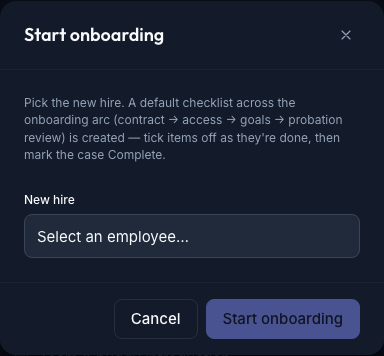
The Start onboarding dialog — pick the new hire; a default checklist across the arc (contract → access → goals → probation review) is created, and the employee moves to the Onboarding state -
Work the checklist. Each case is a card showing its items with checkboxes and a progress bar (N / M done). Tick each item as it's completed — the card always shows, at a glance, where the new joiner is and what's left. This is the day-to-day of onboarding.
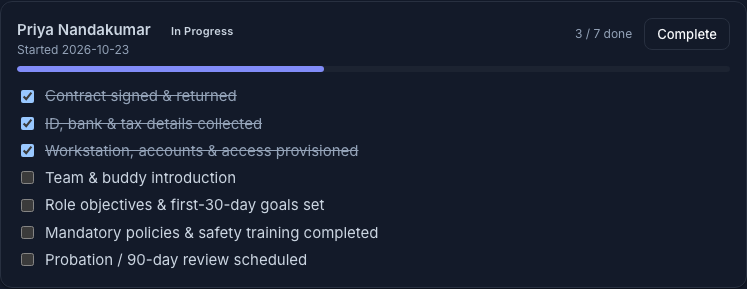
An in-progress onboarding case — the arc checklist with checkboxes and a progress bar (3 / 7 done); ticked items strike through, so what's left is obvious -
Complete the case. When the checklist is done, Complete the case — the employee moves from Onboarding to Active, which is the moment they count as fully onboarded. That transition writes the lifecycle timeline that headcount and attrition read.
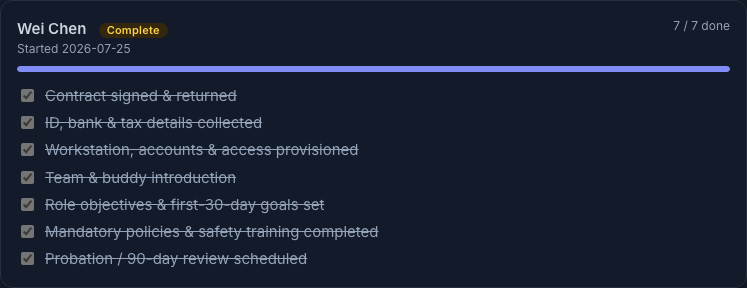
A completed onboarding case — every item ticked (7 / 7), the case marked Complete; completing it moves the employee to Active on the lifecycle timeline
Walked example — onboarding Meridian's new Backend Engineer
Priya Nandakumar — the Backend Engineer you hired in A3 — starts Monday. The hire hands off to onboarding with her details already in place. (Figures illustrative until the corporate seed lands.)
- You start her onboarding case; a seven-item checklist appears and she flips to Onboarding.
- By end of day one, three items are ticked: contract signed, ID & bank details collected, workstation & access provisioned. Progress shows 3 / 7.
- Over the first two weeks: team & buddy introduction, first-30-day goals set with her manager, mandatory policies & safety training completed. 6 / 7.
- You schedule her 90-day probation review — the last item — and Complete the case. Priya moves to Active: fully onboarded, counted in headcount, nothing dropped.
The whole thing left a record: what had to happen, what's done, when she became active — exactly what you'd want if anyone asked whether a step (say, safety training) was ever completed.
The records — the checklist and the timeline
Two things the case captures:
| What it is | Who reads it | |
|---|---|---|
| The checklist | the arc's items + their done/not-done state + a progress % | HR, the manager — "what's left before this hire is settled?" |
| The lifecycle timeline | the dated transitions Onboarding → Active (and later → Separated) | headcount & attrition (A1); any audit of when someone was employed |
What an HR officer reads from it:
- Progress across a cohort — ten new hires at 3/7 two weeks in is a provisioning or manager-engagement problem, not ten coincidences.
- A stalled item — if mandatory training sits unticked for a month, that's a compliance gap with a name attached.
- Time-to-active — how long cases take to complete is your onboarding speed; it's also time-to-productivity in disguise.
Controls & assurance
- The checklist is the control. A standard arc of items means nothing is forgotten — not the bank details, not the safety training — regardless of who runs the onboarding.
- Compliance is evidenced, not assumed. Mandatory policy and training items are ticked against a real case, so "did they complete it?" has a recorded answer.
- The lifecycle is the source of truth. Onboarding → Active transitions write the dated timeline headcount and attrition read — so the people-count is always reconstructable.
- The hand-off carries, not re-keys. A hire from recruitment flows into the case with its details intact, so there's no divergence between the person you hired and the person you onboarded.
Best practices & pitfalls
- Do start the case the moment the offer is accepted — pre-start items (contract, ID, access) should be ticked before day one, not scrambled on the morning.
- Do set role objectives early; a new hire with no goals is a new hire with no way to tell if they're doing well.
- Do treat the 90-day review as part of onboarding, not a separate afterthought.
- Pitfall: treating onboarding as day-one paperwork. The arc runs for months; the retention risk is in weeks two to twelve, not hour one.
- Pitfall: marking a case complete with items still open — you lose the evidence that the mandatory steps actually happened.
- Pitfall: a hire with no onboarding case — an invisible new joiner whose access, training, and goals are nobody's explicit job.
Practise question
Q1. A manager says their new hire "started three weeks ago and is basically up to speed, so we can close the onboarding." You open the case and see 4 / 7 done — mandatory safety training and first-30-day goals are still unticked. What do you do, and why does it matter?
Answer: Don't complete it yet. "Up to speed" is the manager's feel; the checklist is the record, and two of the open items are not optional — mandatory safety training is a compliance requirement you must be able to evidence, and goals are how the new hire and manager agree what good looks like (and what the probation review will assess). Completing the case now would move the employee to Active while leaving a compliance gap with no record it was ever closed. Tick the items when they're genuinely done — then complete.
Terms used here
- Onboarding case — one record per new joiner carrying the checklist, tracked in progress → complete.
- Checklist item — one thing that must happen across the arc (pre-start · day one · first weeks · 90-day), ticked when done.
- The onboarding arc — the structured first ~90 days, not a day-one event.
- Lifecycle state — Onboarding → Active → (later) Separated; transitions write the dated timeline headcount/attrition read.
- Time-to-productivity — how quickly a new hire can actually do the job; what good onboarding shortens.
- Related: Run a recruitment pipeline — where the hire comes from · Offboard / separation — the other end of the lifecycle.
What an auditor / people-ops lead expects
They expect a case per hire, with the mandatory items evidenced and the lifecycle dated: that every new joiner had an onboarding case; that compliance items (safety, policy, safeguarding training) are ticked against a real record, not assumed; and that the Onboarding → Active transition is dated so the headcount is reconstructable. A people-ops lead reads the same data as a performance signal — time-to-complete across the cohort, where cases stall — and asks what the onboarding is costing in lost productivity. "Here is the checklist, here is what's done, here is when they became active" is a complete answer; "they're settled in, trust me" is not.